Say it, and the room changes.
The desktop NLP configuration system for Spaces Flex — a two-pane canvas where a conversation on the left dynamically configures a live kitchen render on the right.
Shipped to 100+ B2B companies — EMEA · North America · US
- Product
- Spaces Flex · AI Showroom
- Desktop AI configuration
- Company
- Cyncly
- 70,000+ businesses worldwide
- Reach
- 100+ B2B companies
- EMEA · North America · US
- Focus
- Configuration · catalog · conversation · moodboard
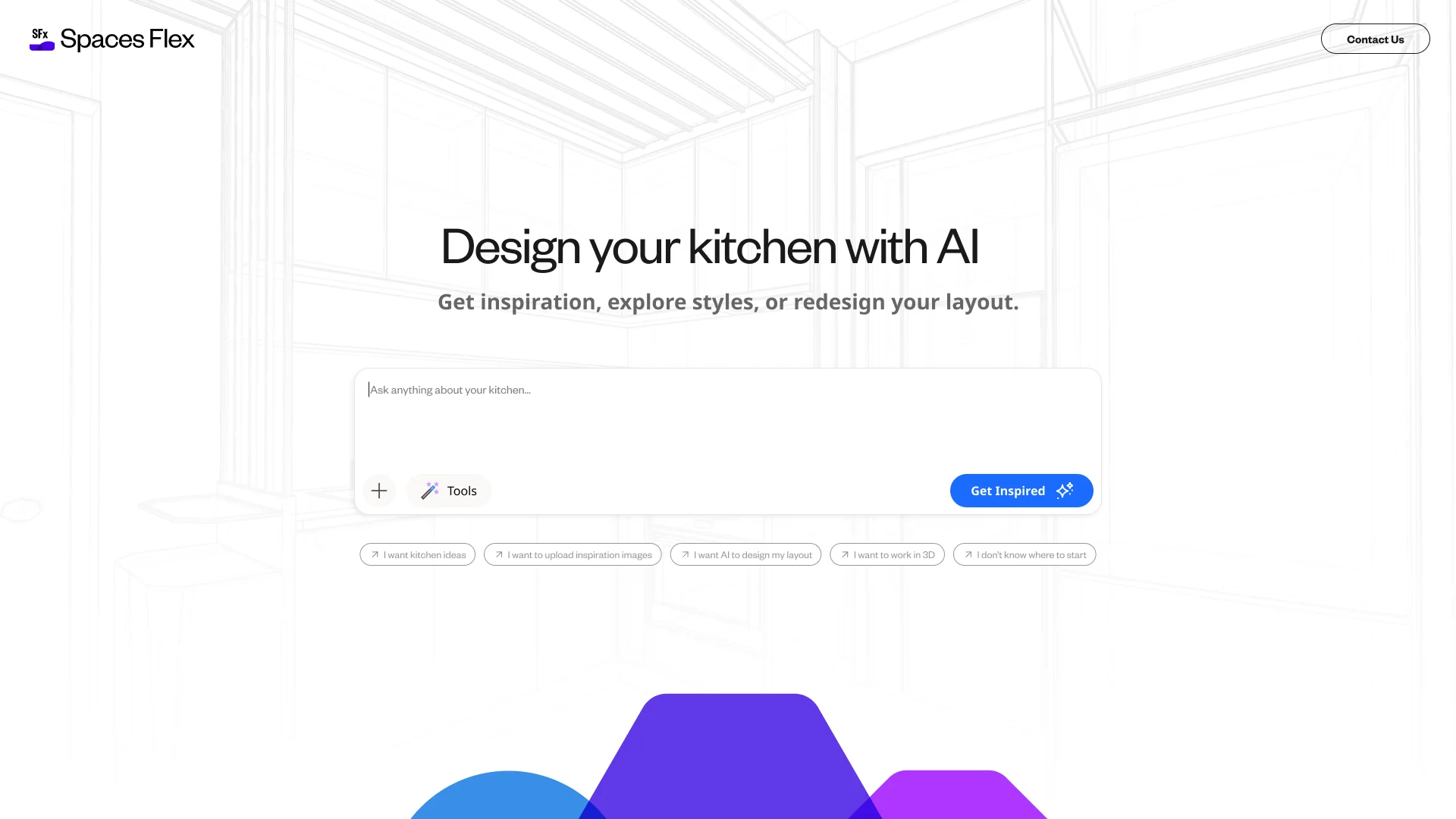
The desktop entry — one prompt, a few starting intents: describe it, upload inspiration, let AI design the layout, or jump into 3D.
02The desktop difference
Desktop isn't a bigger phone — it's a canvas.
Desktop isn't a bigger phone. There's room to show the conversation and the result at the same time, a real catalog to browse and filter, and multi-session work to organise — but all of that can turn a clean idea into a cluttered tool. The challenge was to use the extra space to make configuration feel direct and legible, not dense: every word in the conversation should move something real on the canvas.
So the desktop layout puts the conversation and catalog on the left and a live kitchen render on the right. Where mobile moves one step at a time, desktop lets you see cause and effect at once — change a word, watch the room update.
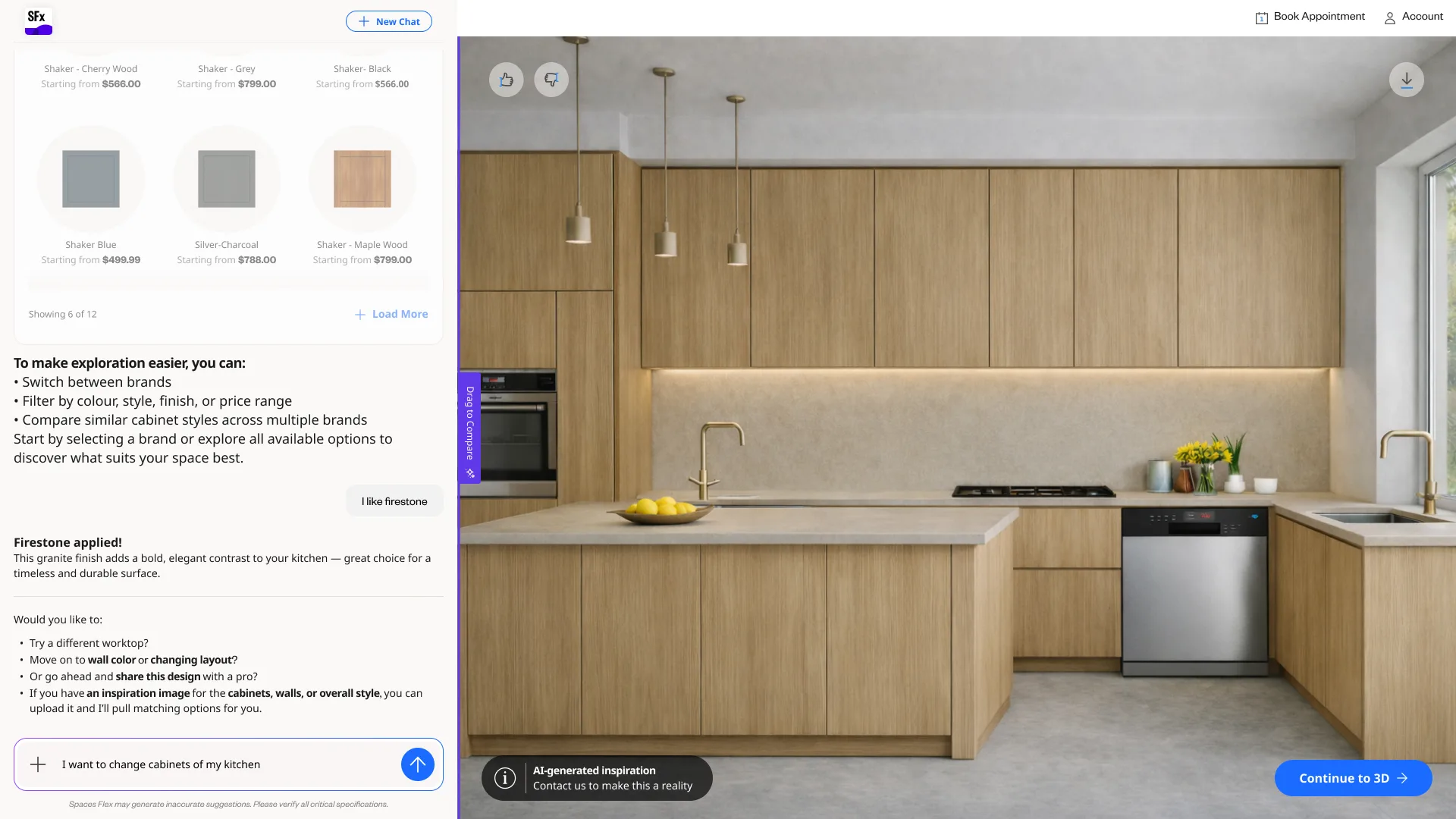
Two panes, one loop: converse and configure on the left, see it live on the right.
03Dynamic configuration & filtering
A real catalog, made browsable — and every choice stays real.
The extra space is spent on the catalog: browse it, filter it by brand, colour, finish and door style, and explore styles with real prices — then watch each selection reconfigure the render. Choosing stays distinct from applying.

Browse the real catalog — filter by brand, colour, finish and door style, with live swatches.
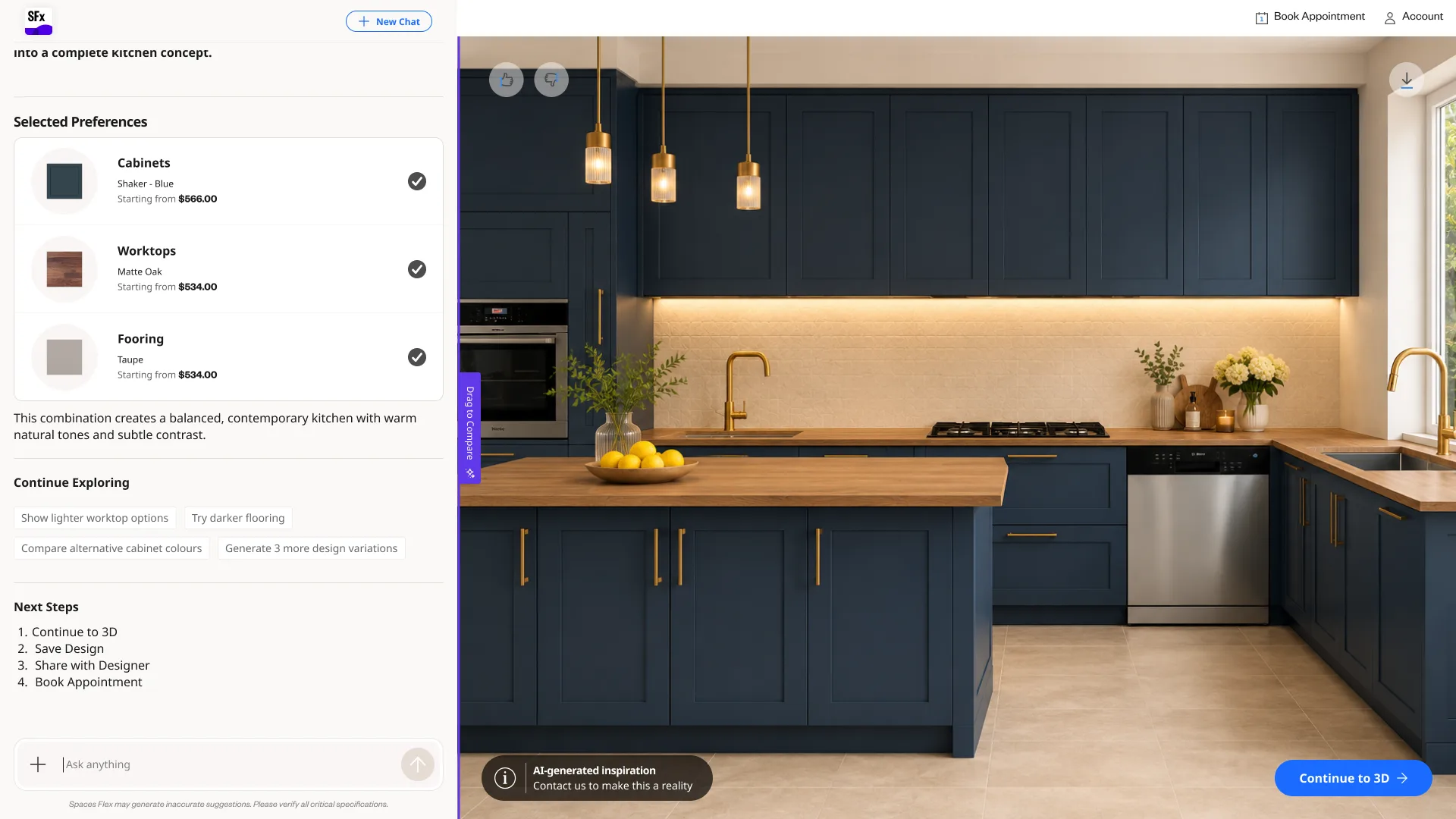
The payoff — a configured space rendered live, with a Before/After compare and a clear path into 3D.
04Moodboard — image to design
From a picture you love to products you can actually buy.
The moodboard flow turns an uploaded inspiration image into two things: a look applied to your own kitchen, and a set of real, catalog-matched products — each with a match score and price. Step through it:
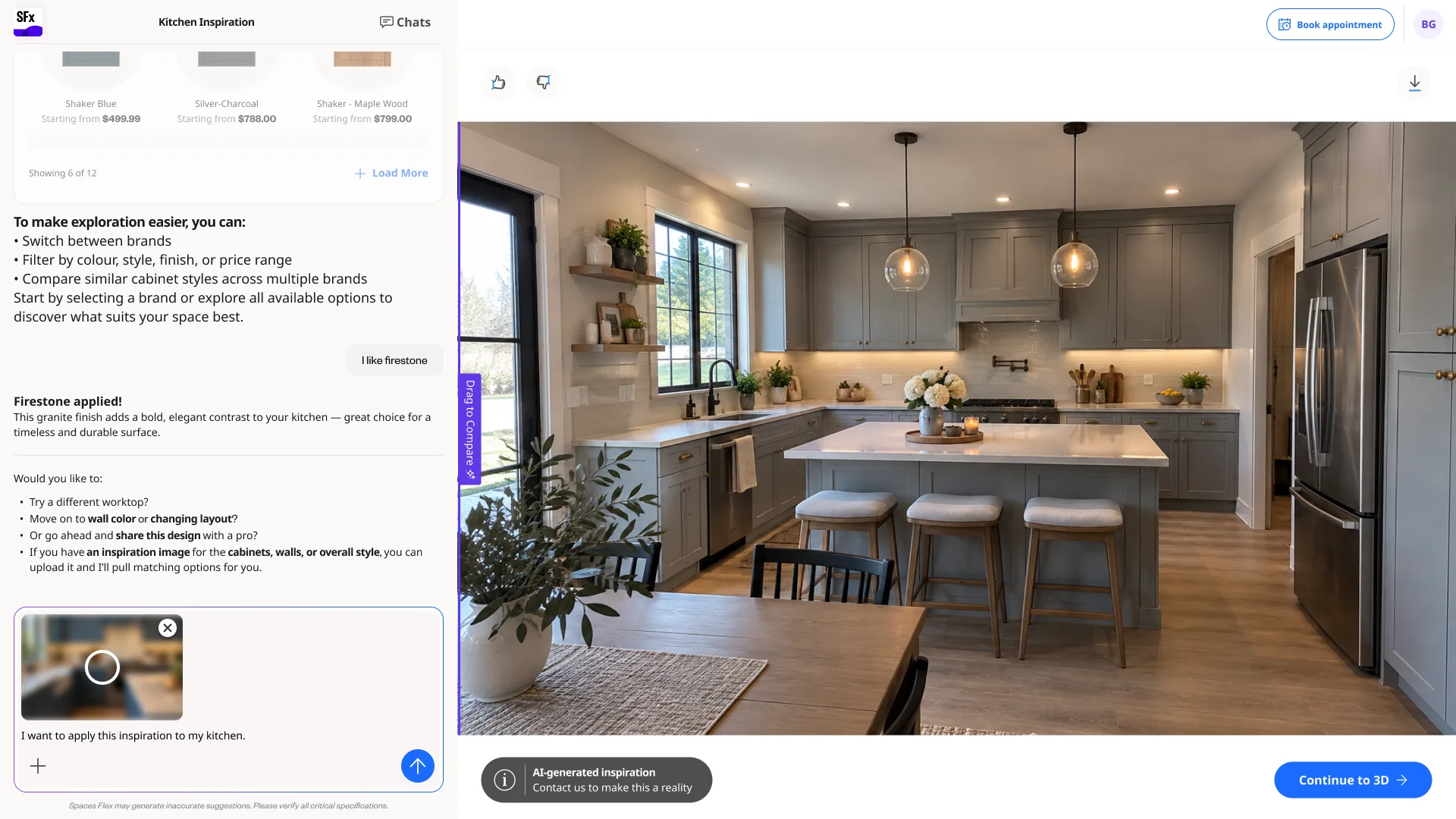
01 — Start from a picture — drop an inspiration image into the conversation.
05Conversations & projects
Work spans sessions — so every conversation is a saved project.
A desktop project rarely finishes in one sitting. Conversations auto-save, named by customer and topic, organised into pinned and recent — with new-chat and a confirm before any delete, and a sign-in gate so the work is there to come back to.
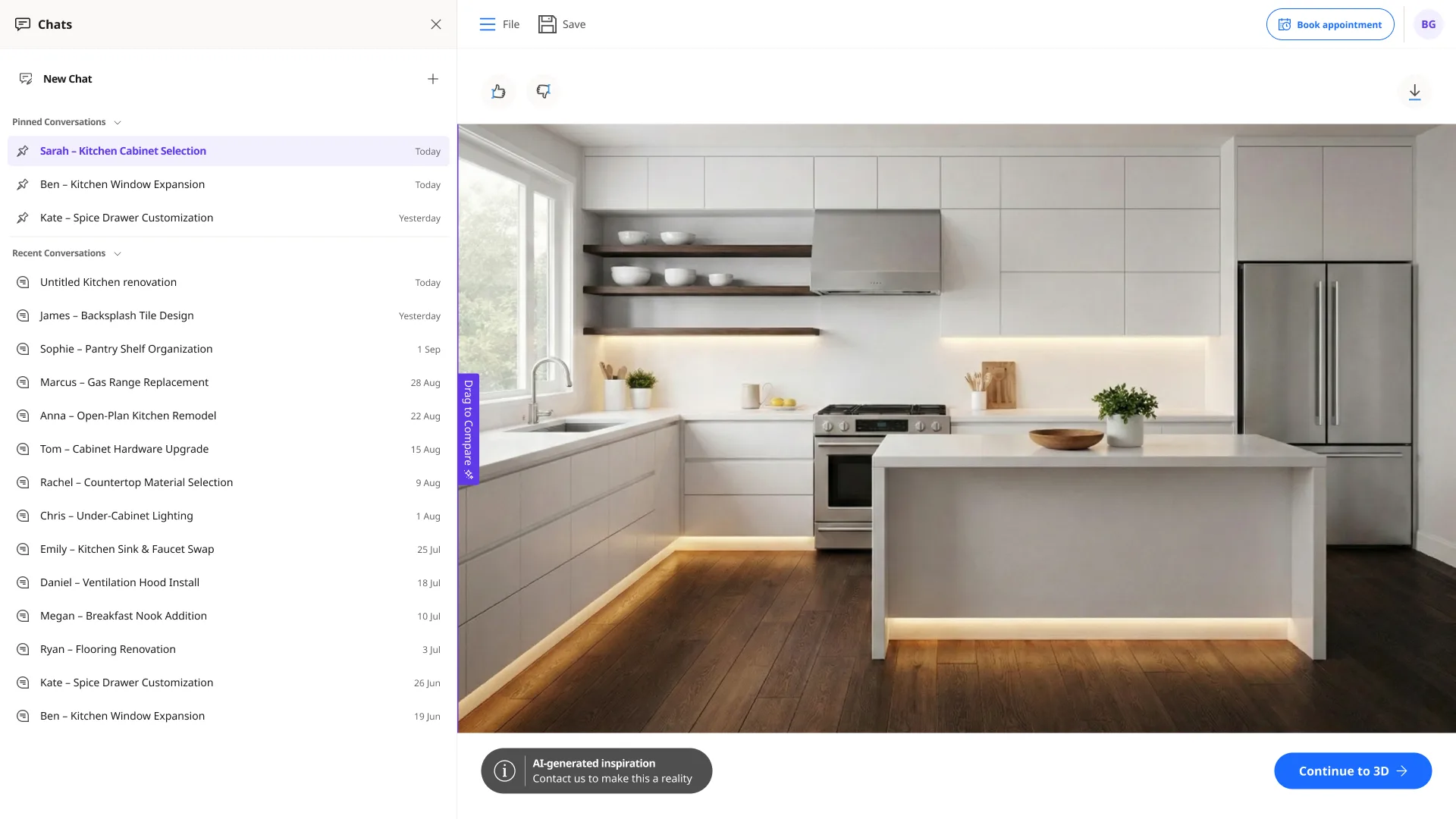
Every conversation auto-saves as a named project — pinned or recent, easy to return to.
06Region & language
A real catalog is local — so the showroom speaks the right language.
The showroom runs across markets, so people choose a language for the interface and the conversation — behind a clear confirm when switching mid-flow — while saved designs and prices stay exactly as they were.

Pick the language — interface and conversation.

A confirm step — switching mid-flow is deliberate.
07The render economy
Every generation costs something — so the showroom says so.
Each render is real compute, so entitlements are part of the experience. Anonymous visitors get a small free allowance; an account and a plan draw from a larger monthly pool. The quota stays visible, and a running-low state warns before the wall.

Try it free — a small anonymous render allowance, always visible on the canvas.
08Every screen, end to end
The whole surface — scroll through it, two rows at a time.
The sections above show the thinking; this is the breadth. Configuration, catalog, renders, the moodboard flow, saved projects, localisation and the render economy — each screen in its own frame.
In closing
What changed
- A desktop two-pane AI Showroom — shipped to 100+ B2B companies across EMEA, North America and the US — where a conversation and catalog on the left dynamically reconfigure a live kitchen render on the right.
- A dynamic configuration & filtering system — browse the real catalog, filter by brand, colour, finish and door style, and explore styles with real prices.
- Conversation management for desktop — auto-saved projects, a named project list, new-chat and delete, with a sign-in gate to persist work.
- A localisation layer and a render-quota economy carried onto desktop, plus an image-to-design moodboard flow that extracts both a look and real catalog items.
What's still open
- Extending the moodboard flow with more room types and richer catalog matching.
- Deepening personalisation as the saved-project and render-economy data mature.
What I learned
On desktop the win wasn't filling the extra space — it was spending it on legibility. Putting the conversation beside a live render, and keeping every catalog choice real and selectable, let people see cause and effect: say it, and watch the room change.
The full picture
This is a slice of a shipped product.
For the complete flows, detailed specifications and a live walkthrough of the AI Showroom, get in touch.
Request the full demoDesign by Conversation